

The Daylight Handoff: How Smart Shades and Smart Lights Can Take Turns Through the Day

Smart lights learned a clever trick a few years ago. Apple introduced Adaptive Lighting with iOS 14 in September 2020, and it shifts the color temperature of compatible lights through the day: warmer in the morning, cooler at midday, softer again in the evening. How-To Geek notes that it launched with Philips Hue bulbs and the Eve Light Strip. In December 2024, IKEA added a dynamic lighting feature to its smart lights that does something similar, which TechRadar described as a feature Philips Hue and Apple Home had offered first. This September, Aqara showed off new tunable lights at IFA 2026, including a floor lamp with a 2,000K to 9,000K white range, according to Apple Home Authority.
Every one of those products is solving the same half of a problem. They make your artificial light behave like daylight. Nothing in that list controls the daylight itself.
That is the gap this post is about. The window is the biggest light fixture in your home, and it has been manual this whole time. When shades and lights share a schedule, the room can follow the sun in a way neither can manage alone.
The Idea: A Daily Handoff
Think of your home as a relay race. In the morning, the sun carries the room and the lights barely work. By midday, the sun is strong enough to cause glare and the shades share the load. At dusk, the sun hands off to the lamps. If the handoff is clumsy, you notice it: a dim room on a bright morning because the shades are still down, a glaring screen at 2 p.m., a lit room on display at 5 p.m.
Here is how a smooth handoff looks across one day.
| Time of day | Shades | Lights | Result |
|---|---|---|---|
| Sunrise | Open fully | Off, or a warm low glow if the room faces away from the sun | Natural light does the waking up |
| Midday | Partly lowered on sun-facing windows | Off | Less glare on screens, no lamps needed |
| Late afternoon | Open again as the sun drops | Adaptive or tunable white at a cooler setting | Bright room for work or homework |
| Sunset | Close to a privacy position | Warm and dim | Cozy room that does not glow like a display case |
Building the Shade Half With RYSE
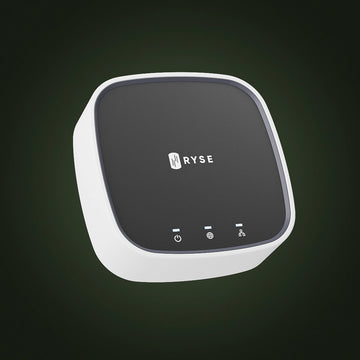
With a SmartBridge ($49.99), the RYSE app can run schedules at set times or at sunrise and sunset, as the help center explains in How can I control my SmartShades? That gives you the sunrise and sunset anchors of the handoff. The help center also notes that SmartShades work with Alexa, Google Home, and Apple HomeKit through the bridge, which supports sunrise and sunset scheduling, custom triggers, and scenes with other smart home devices (see What can SmartShade integrate with?).
A simple starting setup uses three routines:
- Sunrise Open. All east-facing windows open fully at sunrise.
- Midday Shade. At a set time, sun-facing windows lower to a partial position to cut glare. Pick a time that matches when the sun hits your windows, which you can learn by watching a few days.
- Sunset Settle. Street-facing windows close to a privacy position at sunset.
The help center guide to creating a routine covers each step in the app.
Building the Light Half With Whatever You Own
You do not need to buy a specific brand. If your lights already support adaptive or tunable white settings, turn it on. Philips Hue and Eve lights work with Apple's Adaptive Lighting, which requires a home hub such as an Apple TV, HomePod, or iPad according to How-To Geek, and IKEA and others have their own versions. Then let your platform scene tie the two halves together: a sunset scene that closes the shades and shifts the lights to a warm setting in one go.
One tip from Apple's own design: the way Adaptive Lighting works, dimming a light also makes it warmer. That means a dusk scene that dims your lamps gives you warm light for free.
What About Light Sensors?
Some competing shade systems pair with their own light sensors. The iMore roundup of HomeKit smart blinds highlights Aqara, whose roller shade driver can be triggered by motion, light, and temperature readings from the brand's separate sensors. That is a real strength of building inside one brand's ecosystem.
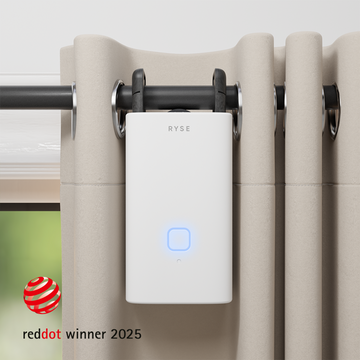
RYSE takes a different route. The SmartShade and SmartCurtain retrofit onto the shades and rods you already own, and they work with the platform you already use. RYSE does not include a light sensor of its own, so the daylight handoff here runs on time, sunrise, and sunset rather than on live brightness readings. If your platform can trigger scenes from another brand's sensor, you can experiment with that, but check what your platform supports before counting on it.
Why Bother?
A tech creator's TikTok about motorized blinds on TikTok is captioned, "You know you're getting old when you get this excited about blinds." That joke lands because the payoff is real. Once the shades stop being the one manual thing in a smart home, the whole system starts to feel coordinated.
Try the Handoff for a Week
- Set the three shade routines above and leave your lights alone for two days.
- On day three, turn on adaptive or tunable white for your main lamps.
- On day five, combine the sunset shade routine and the warm lights into one scene.
- Adjust positions and times based on what bothered you most.
The SmartShade ($149.99) motorizes beaded-chain shades you already own, and the SmartCurtain ($199.99) handles curtain rods. Add them to the lights you already have, and the room starts following the sun on its own.
Share with your community!
In this article
Sign up for our newsletter
Latest from experts

The Daylight Handoff: How Smart Shades and Smart Lights Can Take Turns Through the Day

Your Shades, Your Rules: 12 Creative Ways to Automate RYSE With IFTTT
